Let’s build an SMTP mail server
Let’s build an SMTP mail server
SMTP (Simple Mail Transfer Protocol) is the standard protocol used to send email across the Internet.
Before creating the SMTP server, we need to understand the SMTP protocol handing.
SMTP basics
Here's a quick overview of how SMTP works and how we can handle it in code. Let's start with SMTP Command Flow Example:
Client: HELO example.com
Server: 250 Hello example.com

Client: MAIL FROM:<sender@example.com>
Server: 250 OK

Client: RCPT TO:<receiver@example.com>
Server: 250 OK

Client: DATA
Server: 354 End data with <CR><LF>.<CR><LF>

Client: (sends message body)
Client: .
Server: 250 OK: queued

Client: QUIT
Server: 221 Bye
This is a basic SMTP (Simple Mail Transfer Protocol) conversation between a client (usually an email sender or client application) and a server (email server). It shows how an email message is transmitted. Here's a step-by-step explanation:
- HELO / EHLO:
Client: HELO example.com
Server: 250 Hello example.com
- The client identifies itself to the server with its domain.
- The server acknowledges with a 250 status code.
- MAIL FROM:
Client: MAIL FROM:<sender@example.com>
Server: 250 OK
- The client tells the server the sender's email address.
- Server responds with "250 OK" meaning accepted.
- RCPT TO:
Client: RCPT TO:<receiver@example.com>
Server: 250 OK
- The client specifies the recipient’s email address.
- Server acknowledges it's a valid recipient.
- DATA Command:
Client: DATA
Server: 354 End data with <CR><LF>.<CR><LF>
- Client signals it wants to send the email content.
- Server replies with “354”, telling the client to start sending the body and end it with a line containing only a period.
- Message Body:
Client: (sends message body)
Client: .
Server: 250 OK: queued
- Client sends the email body.
- A line with only “.” marks the end.
- Server replies that the message is queued for delivery.
- QUIT:
Client: QUIT
Server: 221 Bye
- Client ends the session.
- Server closes the connection.
Create SMTP server
Now if we understood the SMTP protocol basics, then let’s create a simple SMTP server using Go. A SMTP implementation from scratch involves creating a TCP server that can parse and respond to SMTP commands like “HELO”, “MAIL FROM”, “RCPT TO”, “DATA”, and “QUIT”.
package main

import (
	"bufio"
	"fmt"
	"net"
	"strings"
)

func main() {
	ln, err := net.Listen("tcp", ":2525")
	if err != nil {
		panic(err)
	}
	fmt.Println("SMTP server listening on port 2525")

	for {
		conn, err := ln.Accept()
		if err != nil {
			fmt.Println("Failed to accept:", err)
			continue
		}
		go handleSMTP(conn)
	}
}

func handleSMTP(conn net.Conn) {
	defer conn.Close()
	reader := bufio.NewReader(conn)
	writer := bufio.NewWriter(conn)

	writeLine := func(line string) {
		writer.WriteString(line + "\r\n")
		writer.Flush()
	}

	writeLine("220 Simple SMTP Server Ready")

	var from, to string
	var dataMode bool
	var data strings.Builder

	for {
		line, err := reader.ReadString('\n')
		if err != nil {
			return
		}
		line = strings.TrimSpace(line)

		if dataMode {
			if line == "." {
				// Email received
				fmt.Println("=== New Email ===")
				fmt.Println("From:", from)
				fmt.Println("To:", to)
				fmt.Println("Body:\n", data.String())
				writeLine("250 OK: Message accepted")
				dataMode = false
				data.Reset()
			} else {
				data.WriteString(line + "\n")
			}
			continue
		}

		parts := strings.Fields(line)
		if len(parts) == 0 {
			writeLine("500 Empty command")
			continue
		}

		cmd := strings.ToUpper(parts[0])
		arg := strings.Join(parts[1:], " ")

		switch cmd {
		case "HELO", "EHLO":
			writeLine("250 Hello")
		case "MAIL":
			if strings.HasPrefix(strings.ToUpper(arg), "FROM:") {
				from = strings.TrimPrefix(arg, "FROM:")
				from = strings.Trim(from, "<>")
				writeLine("250 OK")
			} else {
				writeLine("500 Syntax error in MAIL FROM")
			}
		case "RCPT":
			if strings.HasPrefix(strings.ToUpper(arg), "TO:") {
				to = strings.TrimPrefix(arg, "TO:")
				to = strings.Trim(to, "<>")
				writeLine("250 OK")
			} else {
				writeLine("500 Syntax error in RCPT TO")
			}
		case "DATA":
			writeLine("354 End data with <CR><LF>.<CR><LF>")
			dataMode = true
		case "QUIT":
			writeLine("221 Bye")
			return
		default:
			writeLine("502 Command not implemented")
		}
	}
}
Let’s run our server using the following command:
go run main.go
Then success message will be displayed on the terminal:
SMTP server listening on port 2525
Test using Telnet
We made our SMTP server. Now let’s send e-mail using “telnet”. Open terminal and run the following command:
telnet localhost 2525
After that a message will be appear:
220 Simple SMTP Server Ready
Ok, so let’s run these following commands one by one to send mail:
HELO localhost
MAIL FROM:user1@example.com
RCPT TO:user1@example.com
DATA
this is the body.
.
QUIT
In our SMTP server we will be able to see this output:
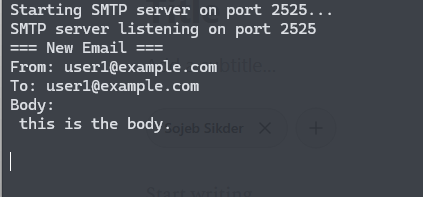
Test using SMTP client code:
In day-to-day life, we send email using SMTP client. You can find lot’s of SMTP libraries for your favorite language. Such as you can use nodemailer package with nodejs or smtplib package with python. As we are writing code in Go, so I will write the client part using Go.
client.go:
package main

import (
	"log"
	"net/smtp"
	"strings"
)

func main() {
	from := "user1@example.com"
	to := "user1@example.com"
	subject := "Test Email"
	body := "This is the body"

	// Compose the email message
	msg := strings.Join([]string{
		"From: " + from,
		"To: " + to,
		"Subject: " + subject,
		"",
		body,
	}, "\r\n")

	// Connect to the local SMTP server on port 2525
	err := smtp.SendMail("localhost:2525", nil, from, []string{to}, []byte(msg))
	if err != nil {
		log.Fatal(err)
	}

	log.Println("Email sent successfully")
}
This is a simple go code, which used to send email. Run the following command to send the email:
go run client.go
And if we look at the server terminal then we can see this email:
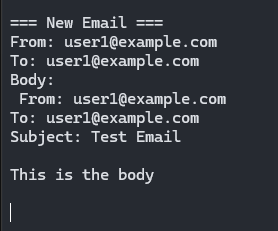
So guys we built a SMTP server, that can send and view email. In next we will a IMAP server. An IMAP server (Internet Message Access Protocol) is used to manage and retrieve email messages from a mail server. Stay tuned.